(If you are looking for help to recover deleted blog, refer to related posts or other related posts at the bottom of this post)
Blogger has introduced Undelete this blog for you to easily recover deleted blogs. Unfortunately there isn't a "Undelete post" yet. So if you accidentally deleted a post, how can you try to recover (undelete) the deleted post? There are 3 ways, one of which depends on the cooperation of a helper plus a good memory or clever guesswork.
Method 1
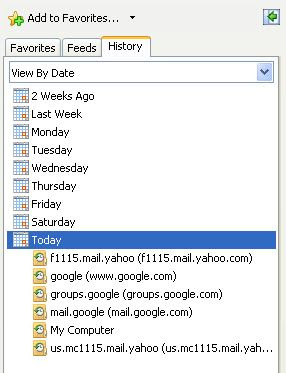
This method is applicable if you are still working on the same computer where you had prepared the post (or had viewed the deleted post). Just press ctrl+H (Cmd+H on MAC OS) to open a sidebar listing the browser history. Go to the part where you were editing the post and continue to edit or publish the post (or copy-paste from the cached copy of the displayed post):
Alternative keyboard shortcut to call up the browser is shift+ctrl+H (shift+Cmd+H for MAC OS).
Method 2
This method is applicable if you had not closed the tab or window where you had been preparing the deleted post (or had viewed the deleted post). Just keep pressing the BACK button till you get back to the point where you were editing the post (or had viewed the post).Method 3
Try to find a cached copy of the deleted post on the Web and restore the post from the cached copy. Type incache:URL
to try to find cached copies on the net.
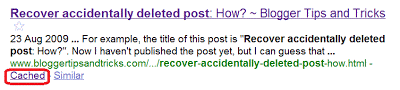
Alternatively, you can just type in some relevant search terms, especially what you can remember from the post title, into the search box and search. If the search throws up a result, click the link cached (see screen shot below) to open the cached webpage and either reconstruct a fresh post with the content from that cached webpage or alternatively use the method described in Recover accidentally deleted post including original permalink and comments to restore the post to its original state.

Another possibility is to try the Way Back Machine. For demonstration, I typed in the old pre-custom domain URL of this blog, namely http://blogger-tricks.blogspot.com into the Way Back Machine and this is what I obtained: archives of blogger-tricks.blogspot.com from Way Back Machine and below are the screen shots of the results:

and here is the screen shot of the October 8 2007 archive which showed no background color for the header and the old Google AdSense custom search box which if you compare with the current search box above, is different thus verifying that is is the actual archive of a page which now is non-existent on the Internet:

Once you have located a cached copy from the search engine, you can either copy the content and create a new post using the pasted content. However, the permalink (individual post URL) will be different from the original. If you don't want to recreate the post but want back the same permalink, then refer to Method 5: recover deleted post with original permalink.
Method 4
This is applicable even if you have no access to the computer where you had edited or viewed the deleted post, but you must have the URL (permalink) of the deleted post. If you don't have the URL, then you can try to guess the URL from the post title.For example, the title of this post is "Recover accidentally deleted post: How?". Now I haven't published the post yet, but I can guess that this post URL will be:
http://www.bloggertipsandtricks.com/recover-accidentally-deleted-post-how
If you have or can guess the deleted post URL and you want to try to undelete the deleted post, you can try posting the post URL and your problem at Blogger Help Forum and hope to catch the attention of a Blogger Employee.
Refer to Recover accidentally deleted post with permalink intact for Method 5
Method 6. Get blog Feed
The idea for this method was obtained from Mishka. Full Success or partial success or failure with this method will depend on whether you have set your blog feed to none, full or short. If you have set blog feed to full, you will even be able to recover the images you included in your deleted post.What you do with this method is to surf over to your blog and look for that feed icon (this section is under editing)
Related post
:Recover deleted blog (undelete blog)
How to recover accidentally deleted blog
How to recover deleted gmail or Google account.
Recover deleted post with original permalink and comments
Thank you soo much for putting up this post Peter.It gave me some hope..phew. I am quite upset about losing a post I had written yesterday. My problem is I think it was still in drafts. Does that totally diminish my chance of finding it at all? I had put in more than two hours in it plus I'm not sure if I can write it the same way! :(
ReplyDeleteThe title I gave it was Jimmy Choo, it was about his seminar that I attended yesterday!! I have to submit an assignment on that too.
Is there anything at all that I can do?
I have recently created this blog. I've transferred four of my posts from Wordpress. The two I wrote here got deleted I suppose. I can't figure out how.I clearly remember saving them both to drafts!! :(
Your help/guidance would be REALLY appreciated!!
Have you tried what had been suggested in the post? Or do you have the URL of the deleted post or at least can guess what is the URL?
ReplyDeleteMethod 2 is not applicable in my case.
ReplyDeleteFunny thing is that with method 2 I manage to go to the page where I was writing the post...but I just get to see the first 2 paras! it was much longer :( I see all the posts I had checked ( even drafts) but for some reason the 2 drafts that got deleted ( and I have no clue how!) aren't there!
It even took me to the pages where I've deleted a post or a draft. The url i noticed says blogger.com/post-delete.g?blogID=....&postID=
Now I can always copy the same blog Id but have no clue about the post ID
Since the title I gave was Jimmy Choo I tried guessing something like http://echoesofthissoul.blogspot.com/2009/09/Jimmy-Choo.html
I wrote the name in several ways but all failed
So not sure if method 3 is working for me...
Nice tip. Thank you sir.
ReplyDeleteI recently accidentally deleted a post dated Feb. 28, 2009 from my blog, The Good, Bad, and Ugly. I think the blog title was Monday through Thursday but am not certain. I desperately need to have a copy of the post. Your help may provide needed legal information.
ReplyDeleteYou have 2 blogs. In which blog was your deleted post?
ReplyDeleteThe blog where the post was deleted was The Good, Bad, and Ugly. Thanks for your help.
ReplyDeleteThen perhaps the deleted post URL is http://art4evr.blogspot.com/2009/09/monday-through-thursday
ReplyDeleteI blog which is deleted might be contains some useful thinks.
ReplyDeletehttp://oopslaw.changjy.com/2009/09/22/know-your-accidental-legal-rights-2/
i accidentally deleted a post prior to posting it. It could be http://talkingoutmyyipper.blogspot.com/theunderstandingthatsurpassesunderstanding. Please help!
ReplyDeleteYour search - cache:http://talkingoutmyyipper.blogspot.com/theunderstandingthatsurpassesunderstanding - did not match any documents.
ReplyDeletehttp://gonewithout-asound.blogspot.com/2008/08/rhythmic-gymnastics.html
ReplyDeleteHow can I revive this post?
i was editing a xanga entry and i accidentally resaved before the page finished loading so everything i wrote was wiped. is there a way for me to retrieve the text?
ReplyDeleteHow about pressing Ctrl+H to open the browser history and go back to where you were editing it? Do let us know if that helps.
ReplyDeleteI tried a few things and at least found some record of the pos in my history, thanks so much for this blofg and the help for this kind of problem.
ReplyDeleteI really need this post to be restored as it a key post that got updated all the time:-0
Here is the long link.
http://fxretracer.blogspot.com/2008/06/eurusd-pivot-trade.html
I have recovered the post.
ReplyDeleteI found a window I had left open that still had the edit post page open.
I then saved everything, and posted it and the post came back.
I've tried everything on this post and in comments, but cannot get back my draft. It had not been published at all. I had highlighted my draft, thinking I would be able to copy and paste it elsewhere (ironically, as back up) and I must have hit backspace or something, because POOF it was gone. The autosave came into play, or something, because hitting undo didn't bring it back. I tried going back in my browser too, but only the Unintentional Edit appears. I have learned my lesson, but if there's any way to get this back I would love to know.
ReplyDeleteTHANK YOU SO MUCH FOR TEACHING US HOW TO RECOVER ACCIDENTALLY DELETED POST. Its really helped me alot..
ReplyDeleteThank you! =)
Thanks so much dude!! u saved my tail
ReplyDeleteMy post that is still in draft, and then an accident click of ctrl+A made the whole post gone;
ReplyDeleteplus the photos that I've uploaded were deleted from my memory card;
is there a chance to retrieve my post?
I wanted my photos badly seriously.
Did you tried the steps listed in this post?
ReplyDeleteI too accidently deleted a post....I had been working on it for over two hours! It had 7 pics on it...and I was almost done and somehow in my typing it just disappeared...I tried all your suggestions and could not find it...one thing I believe I might have done...but I don't really know what it means...other than it erased my post...is I believe I might have hit control n and n ...don't ask me how I figure this...but for some reason that is what I remember as I was typing...so I have since opened up another window and tested what that command does and it is almost like it refreshes the screen...therefore deleting what I have typed...is there any way to recover what I had worked on...it was an important post and I know there is no way I can recreate it. I would so much appreciate your help. I am sick over it.
ReplyDeletectrl+N is open new tab or window and it appears it should not affect current window?
ReplyDeleteI typed a test email and hit control n and it deleted the text...however...it saved it in my draft box. But my original email I am searching to recover is not in my draft box....I went back through my history and there is no trace of it...could I have used some other command that erased it from the file...and just need to use another command to tell it to replace it? In every document in my history I see the post title...but there is no content....I don't understand how 2 hours of typing and pictures can just disappear right before my eyes. ugh!!!
ReplyDelete"In every document in my history I see the post title...but there is no content"
ReplyDeleteThat may mean that the cached version of your post may be blank. However, don't take what I say to be the Gospel truth.
Thank You so muchhhh for teaching us this fatal skills Peter!! I hv used method 1 and it really works!
ReplyDeleteBefore this im using method 2 bt it doesnt work after blogspot has refreshed the browser. I actually wanna copy the content of the post into another post, but I lost it when I accidentally re-copy other things. It's impossible for me to re-write the same thing in the same way. So Im so upset to search for ways to recover it...at least for a hope until I found here. Anyway, thanks and all the best to you! ^^
I have accidentally deleted a draft of a post on a private blog.
ReplyDeleteBecause it is private, I do not want to write the URL here.
May I send you an email with the information, to see if you can help?
Thank you.
Since yours is a private blog, there is no point of giving the URL for not only is it inaccessible to us, the post has also not been cached by browsers. Your only hope is to find a copy in your computer via history.
ReplyDeletePlease retrieve this post for me.
ReplyDeletehttp://kanwalful.blogspot.com/2009/12/hierarchy-of-annoying-facebook-statuses.html
Thank you :)
Tried Way Back Machine but no luck. Your other hope will be to try your computer history or if it had not been too long, the help of a Blogger Employee.
ReplyDeleteThank you so much for posting this helpful information. I was able to recover my post by following Method 1. God bless you.
ReplyDeleteHi Peter, I've been reading your blogs for quite a while now. I'm a new blogger, and have learned so much from you. Tonight I accidentally deleted a post, and again you came to the rescue. Thank you sooooooooo much for posting this ever so useful piece of advice. You've prevented quite a few heart attacks! As I'm sure many fellow bloggers will confirm...
ReplyDeleteWarm regards,
Louma
I found a cached version of my "About" page, which mysteriously went missing! Thank you for your help; I really appreciate not having to write the post over again!
ReplyDeleteI deleted a post by accident after working on it all yesterday.
ReplyDeletesalvaescalerasbritanicas.blogspot.com/
Your tips ae invaulable - the on that worked for me was Control H then search for it from the day I did it worked!
You saved me hours or work doing it again.
I'm new to this - and it is good for search engines in relation to my business (stairlifts UK and Spain)
I need to know about back up so if you can tell me how to avoid his problem in the future it would be appreciated.
In fact I'm thinking of doing a blog just to point people to you! Who funds you?
The Spanish blog is new - but I have lots of posts on the UK one
see it via www.castlecomfortstairlifts.com
I deleted a post by accident after working on it all yesterday.
ReplyDeletesalvaescalerasbritanicas.blogspot.com/
Your tips ae invaulable - the on that worked for me was Control H then search for it from the day I did it worked!
You saved me hours or work doing it again.
I'm new to this - and it is good for search engines in relation to my business (stairlifts UK and Spain)
I need to know about back up so if you can tell me how to avoid his problem in the future it would be appreciated.
In fact I'm thinking of doing a blog just to point people to you!
The Spanish blog is new - but I have lots of posts on the UK one
see it via wwwcastlecomfortstairlifts.com
Many thanks
Backup? For post being prepared, not published yet, only save as draft. For posts already published, see backup blog with export (and restore with import)
ReplyDeleteWho fund me? Nobody. Well almost nobody. I get a bit of income from advertisements.
Peter
ReplyDeleteI tried to email you directly without success.Please contact me.
Keith Robert
Thank you Thank you THANK YOU. It worked.
ReplyDeletethank you so much, just gave myself a heart attack over an assignment blog post i accidentally deleted. Tip 1 worked, phew! thank you!
ReplyDeleteI have tried all your tips and can not successfully retrieve a deleted post. My URL is:thernmtripod.blogspot.com, and the post was called "News...Fears...Feelings"
ReplyDeleteThis is extremely important to me and I have already posted a question on the help forum with no rely. Anything you can do would be amazing!
I am in the process of updating this post. The basic is getting the post ID and one of the method of getting the post ID is getting a cached copy of that particular post. Try to do that and get back to me.
ReplyDeleteThank you very much
ReplyDeleteThank you so much for posting this. Saved me lots of trouble. I deleted my post when it was finally done too! I was panicking.
ReplyDeleteUgh, I spent the last 3 DAYS on a post. It was saved in draft on my blog. I was about to publish it, but accidentally deleted a picture. So I hit the undo button, thinking it would bring the picture back. Instead, POOF, all the text vanished. ARGH!!!!!!!!!!!!!!!! I tried all of your tips, and nothing worked. Anyone else have any other ideas? Thank you so much!
ReplyDeleteTry to get a cached copy of your post or blog and try to view page source so as to get the post ID
ReplyDeleteThank you, but I'm not sure how to do that.
ReplyDeleteSearch using search terms that you can remember of the post, especially the post title
ReplyDeletehey thnksa lot
ReplyDelete,,i deleted all my blogs by mistake but thnks to this.i used tht second method back back back back........and i got my blog back........
Your post gave me some hope... but then the solutions just didn't work.
ReplyDeleteLike some others here I hit the crtl+a and then another key. And my post was gone. Just before I wanted to write the last word of a pretty long entry.
However I didn't have a title yet... so the solutions on your post are not directly applicable (I tried to remember the first sentence though).
thank you very much dude
ReplyDeletei accidently edited a post which is my own poem
then by using METHOD3 i recovered my post back
thank you very much
Thanks you SO MUCH!
ReplyDeleteI ACCIDENTALLY DELETE MY GMAIL FORGETTING IT LINKS TO BLOGGER.
ReplyDeleteNOW MY 2 BLOGS ARE GONE!
IS THERE ANY WAYS TO RETRIEVE THEM BACK!?!?
NEED HELP URGENTLY!
Refer to Recover deleted Google account or gmail
ReplyDeleteMethod 1 has really helped me. Thank you very much!
ReplyDeleteThanks Peter for such a informational post. I have tried all the methods you have mentioned by i am unable to recover my post http://holidaytravelplanner.blogspot.com/2010/07/europe-france-taste-of-paris.html
ReplyDeleteBasically it has got overwritten by another post with a different title when i published from word to my blog. is there anyway my old post can be reinstated? Pls help
Sounds like you have 2 possibility. One is if you have set your feed to full and if you can get hold of the feed for that post
ReplyDeleteThe other is to get the attention of a Blogger Employee such as Gatsby at the Blogger Help Forum and hope he can help you restore your post as you have the exact permalink (post URL)
Thanks Peter. I have recreated my blog. I had posted the query on google help also but havent recieved a response so far on whether it is possible to revert overwritten changes.
ReplyDeleteThank you so much. I just started on my first blog, had 3 things written and mistakenly deleted them when i was trying to delete some extra drafts. Had I not been able to recover those i may have never blogged again!
ReplyDeleteThank you so much! Your post is very helpful... especially to newbies like me. It was so frustrating when I accidentally deleted my post! Again, thank you so much!
ReplyDeleteThanks a bunch Peter for this VERY helpful tips.
ReplyDeleteI found my feeds, but how do I restore them to my blog (with the comments, if possible).
I'll really appreciate your expert tips on this.
Thanks again!!!
whisperinginn [at] gmail [dot] com
Depending on what we have, recovery or restoration depend on what we managed to find. Restoration can be just simple republishing of the data with or without the photos if the text of the post is all we have. However, if we managed to get the post ID we can have a full restoration as explained in Recover deleted post including comments and permalink. Unfortunately the feed will not have the post ID
ReplyDeleteHi. I was editing an old blog post and accidentally deleted a photo. I don't want to click "save now" or "publish post" because I don't want it saved this way, but I don't know how to go back to where I had the picture. Please help!
ReplyDeleteThanks.
hi peter! ur post is really valuable. but unfortunately i am not at the computer where the post are being deleted and i cant even use the waybackmachine. the deleted post doesnt even have title to it BUT they were given tags. my blog is being shared and our post are being tagged. can i retrieve back those deleted post which were posted by the other writer. i need help so much.
ReplyDeleteVery small problem. Just go to Picasa web album while signed into your Blogger account.
ReplyDeleteFor Diya, try to get the feed for your blog
ReplyDeleteBlog URL: www.myplacetoyours.blogspot.com
ReplyDeleteBrowser: Mac Snow Leopard
I was almost finished w/ a long post that had lots of links and pics. I deleted a pic and somehow all but the first two sentences of my post were deleted. I'd been saving/auto-saving all along. Unfortunately, Blogger auto-saved the EMPTY post before I could stop it. My post did not yet have a title, but the first two lines are:
Several weeks ago I wrote a post highlighting this vintage praying lady. You may have seen it ...
Peter, I've tried all of the methods you suggest with no success. FYI: 1) My Blogger window has remained open since the deletion. 2) Method 1 returned me from Firefox to my desktop; no sidebar even came up. 3)My blog is set to FULL on the feed (although I don't have any idea what to do w/ that info!)
Can someone PLEASE help me retrieve my draft!!!
Thanks in advance.
Susan, here is your feed: myplacetoyours.blogspot.com/feeds/posts/default?alt=rss (best viewed with Firefox)
ReplyDeleteOh my god, why didn't I think of that?! Thank you so much! Method 2worked :) So maybe my blog isn't that great, or all that important, but it took me an hour to write this post and losing it sucked. Thank so much again!
ReplyDeleteHello, I searched for the deleted post using key words from the post. But when I click on cache, the deleted post does not appear in the cache at all. So I cannot recover the postID from the source page.
ReplyDeleteHere is the SERP- http://www.google.com/#sclient=psy&num=10&hl=en&q=once+in+a+while+love+gives+us+a+fairytale+with+a+twist&aq=f&aqi=&aql=&oq=&gs_rfai=&psj=1&fp=6acc1525ae789cdb
The post I want to recover is the third one- With a Twist...
Is there any way you can help, please?
The SERP you gave contains posts
ReplyDelete- The Big Cosmic Question
- There's a Stranger in my House
- An Independence Day Thought
- The good part of rainy summer..
- Boredom x Time = A Tag !!
- The Car Hunt
Found this "postID=5952799719043367793" for the first by typing
cache:http://supergirl20.blogspot.com/2010/10/big-cosmic-question.html
Is the post you want included in the list above and if not, can you remember its title?
Hey, no the post I want to recover is not included in the list- I cannot understand why it does not appear in the cache.. I searched for the post using a few words I remember from the text, and the SERP contains an excerpt of the deleted post with those search words, but when I click on cache, the full post does not appear in that. I cannot remember the title but I know that it was published on October 21 2009, between posts "An Independence Day thought" and "There's a Stranger in my house".
ReplyDeleteDoes that help in any way?
Try to remember the post title
ReplyDeleteHey, Peter, thank you so much for your post, I tried method 2 it did worked for 2 of the postings. But I still haven't been able to recover one of my last post. Do you know what possibly could have happened? I published it just about like 2 or 3 days ago, does it have any effects? Like it won't show up on cache until a while? Will it show up after like say a week or two? Thanks a lot!
ReplyDeleteThere are other ways such as checking your blog feed etc. Have to tried them? Also read recover deleted post including original permalink
ReplyDeleteI did try method 1, but I can't find the post in my history. I don't think I can try the other one, because I don't have the original permalink. How do you get the blog feed thing? I'm can't find it under editing. Thanks!
ReplyDeleteWhat is your blog URL? If you have published (then deleted) the post, it would have a permalink which if you can retrieve it can help you restore the post
ReplyDeleteI think my keywords are pretty general, I wrote a review on Social Network, so I think it'll be hard to find it. When I google it, I can't find mine and got tons of results. Can't use your recover deleted post including original permalink. My URL: http://www.littleboywithbigdreams.blogspot.com/. Thanks!
ReplyDeleteThanks toooons!!!!! I'm breathing normally now!! Thanks again :D
ReplyDeleteomg, thank you so much! I've got back my post! REALLY REALLY THANKS! xo
ReplyDeleteOMG THANK YOU SO MUCH!
ReplyDeleteThanx a lot...it helped me lot..
ReplyDeleteThank you for posting. The cached method worked pretty well.
ReplyDeleteI deleted all of my posts in one go by ticking the 'all' box and deleting them because it was what I wanted at the time.
ReplyDelete3 days later I'd like to recover them, what is the best way that I can do that?
Thank you :)
All???? Sounds like you have a tough job ahead of you.
ReplyDeletePeter,
ReplyDeleteThank you, thank you, thank you!!! I used Method 1 and it worked!! I have never deleted a post before in 535 posts, and I can't BELIEVE I did that, but thank the Lord that there are people like you out there who know how to help in situations like this! I linked to this very helpful post in my blog, and can't thank you enough.
Blessings,
Wendy Gunn
Faith's Firm Foundation
www.wendygunn.net
I have already given a link and can't change that page link given there. Now I failed to redirect the url link too. I do have the copy of the post but the url link I am unable to obtain back.
ReplyDeleteIs it possible to get back the url link.
Just a try.
If you have deleted the post, perhaps you can look at the URL and try to guess what to put in a new post title from the URL like for example for this post
ReplyDeletehttp://www.bloggertipsandtricks.com/2009/08/recover-accidentally-deleted-post-how.html
I would guess that putting "Recover accidentally deleted post - how" would be what I have to put in the post title in order to get that URL back.
one more thank you from me! Method 1 alone has helped me recovered my accidentally deleted post. :)
ReplyDeleteThanks a lot!!
ReplyDeleteYour post and tip helped me retrieving an accidentally deleted post.
ReplyDeleteThank you so much!
Thank you very much...
ReplyDeleteIs there a way to recover a typed Note on Facebook? I was writing this certain note of mine when suddenly my laptop restarted. Also, the history of my laptop has just been cleared so, is there a way? Thanks
ReplyDeleteHi Sir I have deleted all prior edited blog involving the same topic thinking the latest is still there. Unfortunately its incomplete and gone. My last URL posted in FB is http://lawprofile.blogspot.com/2011/04/technology-and-generation-gap.html?spref=fb please help me retrieve this first blog sir. Thanks
ReplyDeleteTHANK YOU! THANK YOU! THANK YOU! You have saved the day!
ReplyDeleteThanks for these tips!
ReplyDeleteHello
ReplyDeleteYesterday I posted on my blog MusMei.blogspot.com The post has somehow mysteriously disappeared, though it still shows up on "My blogg list".. The title of the post was Mai Minner. What has happened here?
Hilde
No prblem viewing with Google Chrome
ReplyDelete"TORSDAG 12. MAI 2011
Mai minner
Mai er en travel måned her i huset.. Ikke bare er begge våre to barn født i denne vakre måneden, men så er jo maimåned også Festspill måned her i Bergen......
Hi there
ReplyDeleteI deleted a post on my site 365microstoryproject.blogspot.com - managed to find it and repost it but its now posted on the wrong day and as the site is meant to be daily it looks all kinds of wrong, any idea how to get it back to the original date?
thanks
Dave, refer to How to manipulate post date and time to make it remain at the top of main page and see how dates and times are manipulated as per your wish.
ReplyDeletehttp://www.emeryn-selina.blogspot.com/
ReplyDeleteBrowser(s) Name/Version: Firefox
My posted post on May 12, 2011 was gone. I don't remember deleting it but I just cant find it. The post title should be "Happy Mother's Day". http://emeryn-selina.blogspot.com/2011/05/happy-mother's-day.html .
I tried many suggested ways but it doesn't seems to work. I saw my setting has a FULL (Allow Blog Feed) but how do i go about it? Thanks
Thanks Peter, forgot to come back and check but thank you very much for your help
ReplyDeletethanks a lot for your help .
ReplyDeleteyou helped me out of a serious jam tonight, thanks a ton
ReplyDeletePlease help! I have a private blog - not password protected, but just not searchable. I accidentally deleted 2 or 3 posts yesterday from my iphone and I can't get them back. My blog doesn't have that many page views, so when I tried the web cache solution it didn't work. Can you help?
ReplyDeleteI have recently created a non-searchable blog but I managed to find it via a Google search box so perhaps you can still use the methods outlined in this post
ReplyDeleteThanks. I love Google. That's how I found you. I was able to recover my blog and my post by following your instructions.
ReplyDeleteNancy
http://nancywelchon.blogspot.com/2011/08/skeleton-key-necklace-with-vintage.html
Thanks a ton! You helped me recover my blog and a post that had ranked on the first page of google.
ReplyDeleteNancy
http://nancywelchon.blogspot.com/2011/08/skeleton-key-necklace-with-vintage.html
I have been working on a post as a draft for several days and was almost done with it and wanted to see if i could put a graph in the post. It did not work right so I clicked on the part where I thought the graph was and pressed delete and the whole 70 pages of my post was wiped out. This has happened to me twice before where I tree to delete something and the whole post disappears. What is going on? Is their anyway to get it back or do I have to start over!!! The Title of the post is still there. It's called News About the Fed Banking and Finance.
ReplyDeleteAlso how do you get back to me or I to you? Do you answer me directly by email or do I go back into this site? I have no clue.
The methods of trying to recover a deleted post are all in this post. The part about clicking the back button may help.
ReplyDeleteYou can always check to see if there are any responses by subscribing to comments.
ReplyDeleteYou have saved ME!!!! thanks a lot!
ReplyDeleteThank you so much for posting this, you saved one of my top posts that I accidentally deleted--you're a genius!!
ReplyDeletehi...i'm not really understand how the method 6 works...can u explain it further?
ReplyDeletethank you!
thank you! thank you! thank you! thank you! thank you!!!
ReplyDeleteseriously thank you so much! YTB...you're the best!
ReplyDeleteThank you so much for this really useful post... I was despairing but thank to you everything is back as before!
ReplyDeleteTHANK YOU THANK YOU THANK YOU!!! This was a lifesaver. I actually could not use any of your methods precisely because there was no cache of my blog anywhere to be found. However, I happened to have that post opened on a safari page on my phone. I copied it all, emailed it to myself and then pasted it right back it. WHEW!! I would not have thought of that without reading your post.
ReplyDeleteTHANK YOU THANK YOU THANK YOU THANK YOU!!!!!!!!!!!!!! RELIEF! I'm currently developing a blog for my geography coursework on the great firewall of china, www.thegreatfirewallofchina.blogspot.com, and was creating a LOOOOONG post, when my finger slipped and I pressed ctrl+w :/ Then, through the desperation, I came here. THANK YOU EVER SO MUCH!!!! I recovered it!!
ReplyDeleteHi Guys,
ReplyDeleteI deleted a post about 8 or 10 months back and now I want it back so bad! Anybody, please help me recover the page, I just need to read it!
Thanks in advance :)
Try the Way Back Machine
ReplyDeletethank you - total lifesaver!
ReplyDeleteI literally just deleted a post about 1 hour ago. The URL is http://alittlebitofgreensunshine.blogspot.com/2012/03/49-days-later.html
ReplyDeleteAre you able to assist me? I deleted it on my iphone...
Refer to
ReplyDeleteRecover deleted blog -(undelete, restore)
Recover accidentally deleted post Part 2 with original permalink and comments
This was a great help! #3 was a great reminder about caching. I was able to copy and paste a Google cached version back into Blogger, and I didn't have to even change anything!
ReplyDeleteThanks so much!
Yes, the same comment from me too. #3 solved my problem when I realized, a month later, that I had deleted a post.
DeleteThanks a bunch.
I hope you would be able to help. I run a blog in HUngarian www.benbandita.com and after writing each posts I export the blog and import it under www.benbandit-en.blogspot.co.uk, then I delete all the imported posts and translate the new post to English and publish it. In that way i have a bilingual blog. I had. As the new interface of blogger deleted all posts not just my imported ones. So in a matter of seconds I have lost two years worth of English posts.... I backed up the HUngarian version (as I was always exporting them) but lost all the English blog. (I have not deleted the blog so I cant use the undelete method) and I have not just lost 1 post so finding old cached versions of posts doesnt help.
ReplyDeleteWould you have any advice for me?
Your help is appreciated
You used such a convoluted way to create a bilingual blog and so many deleted posts. I don't have a solution to offer. Or perhaps the way back machine?
ReplyDeleteSomeone hacked into my blog and deleted every single post 4 days ago. How do I get them back? This is a blog that has over 10,000 views. www.therea-lifetimes.blogspot.com
ReplyDeleteGet blog back or get posts back?
ReplyDeleteThank you very much! Accidentally deleted a rather long post I wrote today and was quite disheartended at the thought of having to write it all again. I managed to use method 1 to recover it, excellent advice, thanks!
ReplyDeletehttp://thereisnotenoughartintheworld.blogspot.co.uk/
Thank you so much for these tips! With your help I was able to retrieve a post I had deleted on accident. I am so happy to have found your blog!
ReplyDeleteI tried all of these, and can't get any of them to work. I do have my blog feed set to full - any further instructions on that one? My blog is huffreadsstuff.blogspot.com and the deleted draft was called "You're STILL pumping II?"
ReplyDeleteThanks for the suggestions!
Try this: Recover accidentally deleted post Part 2 with original permalink and comments
ReplyDeleteThanks for your response. None of them have worked for me. I'm so frustrated, but I guess I need to write the whole thing over. It was due last week! Thanks again.
ReplyDeleteMethod 1 worked. Thank you so much!
ReplyDeleteThis was a HUGE help to me. Thank you!
ReplyDeletethanks, it helped me.
ReplyDeleteregards
Hi,
ReplyDeleteI was wondering if you could help me with a problem; I have accidentally duplicated the text from one post into another post and then clicked "Publish" whilst in the editor.
I was wondering if there was any way to get the original text back?
I have tried all of the methods above but to no avail.
Many, many thanks if you can help!
James
You can try googling for the post in the Internet and try to find the cached post.
ReplyDeleteJames, there is another post - Recover accidentally deleted post Part 2 with original permalink and comments. Did you read through that?
I am trying to categorize my readers according to country. Which country are you from, James? (no need to answer if you don't want to)
ReplyDeleteHi Peter, thanks for the reply.
ReplyDeleteI have read through the second post and have tried the methods there (including searching for the cached post) but I couldn't get it to work.
The blog was private until after I made the above error, so I don't know if these 'external' methods will work? I was wondering if there was any internal way of recovering the text? I believe there is a function similar to this in Wordpress, but can't find much about it for Blogspot.
And I am from Scotland, UK. Hope that helps.
Thanks again,
James
Thanks a lot Peter ! .. i was able to recover the cached copy of my accidentally deleted post.
ReplyDeleteThank you so much..!!!!!!!!!!!!!!!!!!!!!!!i just recovered from google in cache and edited few modifications only and i republished !!!!!!!!!!!!!!!!!!!!!
ReplyDelete